






Introduction
Ever tried to update a brand color across dozens of components in Figma, only to find yourself buried in endless overrides? You tweak one frame, and five others fall out of sync. That’s when you start thinking, there has to be a smarter way to manage design consistency.
That’s where the conversation around Design Tokens vs Variables begins. Both seem to promise the same thing: a single source of truth for your design decisions.
Yet, under the surface, they solve slightly different problems, and understanding that difference is what separates a scalable design system from a messy one.
Variables help you reuse values like colors, spacing, and text styles across your design. They make small updates faster and keep things uniform. Design tokens, on the other hand, take this a step further. They’re built to connect design and development, so the same values stay consistent not just in Figma, but also in code.
Let’s keep on reading to know about the design tokens vs variables in Figma and which one to choose and when.
Learn Top 10 Mistakes in Web Design That Are Costing You Users And How to Fix Them?
What are Design Variables?
In simple terms, design variables in Figma are reusable values that help you keep your design consistent and easy to update.
They let you define things like colors, spacing, radii, or text sizes once — and then reuse those values across multiple components and files. If you ever need to change a value, like a brand color or button radius, you just update the variable, and every connected element updates automatically.
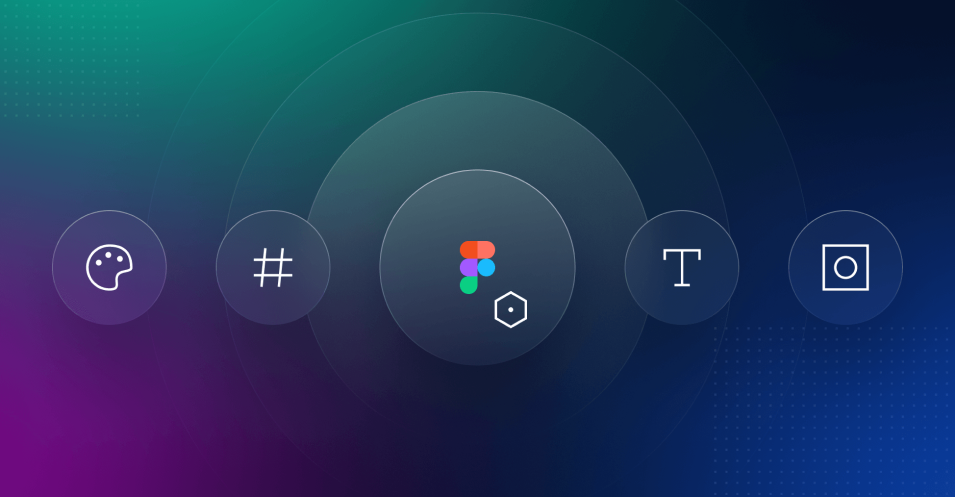
Figma introduced variables to reduce repetitive edits and to make it easier to manage themes, modes (like light and dark), and responsive designs. You can even organize them into collections (for example: Colors, Spacing, or Typography) and link them with design tokens when syncing with code later.
What are Design Tokens?
Design tokens are the bridge between design and development. They store all the key design decisions, like colors, spacing, typography, and shadows, in a structured format that both designers and developers can use.
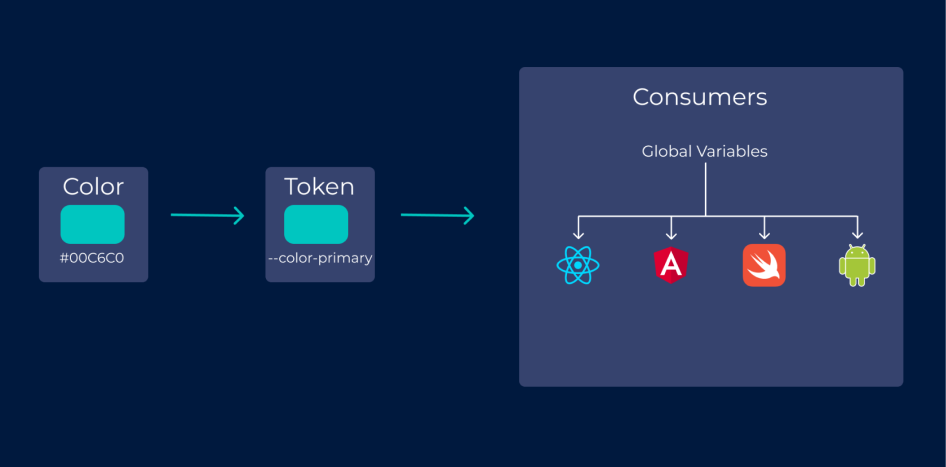
Instead of defining a color as #0D99FF in Figma and then hardcoding it again in CSS, a design token gives it a shared, meaningful name like color-primary. That same token can be used in both design tools and codebases, ensuring consistency everywhere.
Design tokens usually include:
- Colors (e.g., color-primary, color-background)
- Typography (e.g., font-size-body, font-weight-bold)
- Spacing and layout (e.g., spacing-medium, border-radius-small)
- Effects (e.g., shadow-elevation-1, opacity-disabled)
They’re typically stored in a format like JSON, so developers can easily integrate them into design systems or component libraries.
In simple terms, design tokens transform your design choices into code-friendly values, ensuring your brand looks and behaves consistently across all platforms, including web, mobile, and desktop.
What is the Difference Between a Variable and a Style in Figma?
The table below breaks down everything you need to know about design tokens vs variables in Figma.
| Aspect | Design Variables in Figma | Design Tokens in Figma |
|---|---|---|
| Definition | Design variables are reusable values in Figma that define colors, spacing, radii, and text styles. | Design tokens are standardized design values that connect design and development across platforms. |
| Main Purpose | Keep Figma components visually consistent and easy to update. | Maintain a single source of truth for design decisions across design tools and codebases. |
| Usage Scope | Limited to Figma design files. | Works across Figma, CSS, Android, iOS, and other development environments. |
| Structure | Organized into collections like Colors, Spacing, or Typography. | Stored in structured formats (like JSON) using clear naming conventions. |
| Format | Managed visually inside Figma. | Exported or synced as code-friendly values. |
| Collaboration | Best for designers working within Figma projects. | Enables collaboration between designers and developers. |
| Example | color-bg-primary = #FFFFFF | “color.bg.primary”: “#FFFFFF” |
| Scalability | Great for smaller teams managing simple Figma files. | Ideal for larger teams building scalable design systems. |
| Integration | Used only within Figma. | Integrated into design systems, style guides, and front-end frameworks. |
| Best Use Case | When you need quick updates inside Figma. | When you need consistency between Figma and code. |
Want to see how these principles impact real-world trends? Explore 22 Interesting UI/UX Statistics to Know in 2025 for insights on where the industry is heading.
How to Use Variables and Tokens Together?

You don’t have to choose between design tokens vs variables in Figma; the best workflows actually use both. Variables make design work flexible inside Figma, while design tokens help share those same values with developers.
When they work together, your design system becomes faster, cleaner, and easier to maintain.
Here’s how to combine them effectively:
- Start with Variables in Figma
Define your color, spacing, and typography values as Figma variables. Keep them organized into clear collections (for example: Colors, Spacing, Text). - Apply Variables to Components
Use those variables across your components, buttons, cards, and forms so any update automatically reflects throughout your design. - Convert or Sync to Design Tokens
Once your variables are consistent, export them as design tokens using a plugin or tool like Figma Tokens, Supernova, or Style Dictionary. This converts your Figma values into code-ready tokens. - Share Tokens with Developers
Developers can then use those same tokens in code (CSS, Android, or iOS) to maintain visual consistency. This eliminates the gap between design and development. - Keep Both in Sync
Whenever you update variables in Figma, refresh your tokens so both design and code stay aligned. Most teams automate this through plugins or CI/CD workflows.
In short, variables are your building blocks inside Figma, while design tokens carry those building blocks into production. When used together, they create a single source of truth that connects designers and developers seamlessly.
Why Use Variables and Tokens Together When Tokens Can Do Both?
It’s true that design tokens can represent almost everything: colors, spacing, typography, and even motion values, and can be used both in Figma and in code. So why do we still need variables?
Because in Figma, variables handle design logic, while tokens handle communication between design and code.
Here’s the difference between design tokens vs variables:
- Variables are built for designers. They make it easy to swap themes, adjust values visually, and preview how changes look inside Figma.
- Tokens are built for systems. They store those same values in a format developers can use and add naming conventions, structure, and hierarchy that scale across multiple platforms.
Using them together ensures two things:
- Designers get the flexibility of visual editing through variables.
- Developers get reliable, standardized data through tokens.
You can think of it like this:
- Variables = how values are used in Figma.
- Tokens = how values are shared beyond Figma.
Final Thoughts
As Figma continues to evolve, the line between design tokens and variables is getting clearer. Variables bring flexibility to the design process, letting you manage themes, colors, and styles right inside Figma. Design tokens take that foundation further, turning those same values into something developers can trust and reuse across every platform.
That’s the kind of process we believe in at Enstacked. Our dedicated designers don’t just create beautiful interfaces; they also set up the systems behind them for a smooth handoff.
Because building a great product today isn’t about tools, it’s about how seamlessly design and development speak the same language. Get free consultation today
Frequently Asked Questions(FAQs)
The main difference between design tokens vs variables is scope. Variables are used inside Figma to manage reusable design values like colors and spacing, while design tokens are used to connect those values with code, ensuring consistency across platforms.
If you’re managing visual consistency within Figma, variables are enough. But if your team wants to create a unified design system that developers can use too, design tokens are the better choice. It depends on your workflow and how closely design and code are connected.
Yes. Many teams use variables in Figma as the foundation and then export or sync them as design tokens. This way, both designers and developers work with the same design values, reducing inconsistencies.
Because it helps teams build scalable design systems. Understanding the difference between design tokens and variables enables you to organize your design workflow efficiently and maintain brand consistency across all platforms.
Not exactly. A variable in Figma can become a design token when it’s shared beyond Figma, for example, when it’s exported to code. In simple terms, every token can come from a variable, but not every variable is a token.

