






Introduction
Most websites chase clicks. Funnels chase behavior. That’s the real shift.
Imagine someone lands on your WordPress site from a Facebook ad or Google search. They scroll for a moment, click a button, and within a few steps, boom, they’re signing up, buying, or booking.
That seamless journey isn’t luck. It’s a funnel.
Still, most WordPress websites don’t actually guide visitors anywhere. They inform, showcase, look nice, but don’t convert. That’s where funnel-building changes everything.
If your site looks great but leaks visitors, you don’t have a design problem; you have a journey problem. Funnels fix that. They meet your audience at different stages of intent and quietly move them closer to a decision.
This guide is all about how to build a sales funnel in WordPress and re-engineer the way your WordPress site thinks, speaks, and sells, so every scroll, form, and click feels like a natural next step.
Did you know, 48% of marketers are prioritizing the improvement of their sales funnel & 570,000 sites use at least one sales funnel building technology.
Why Building a Sales Funnel in WordPress Matters?

A WordPress sales funnel turns your website from a static catalog into a conversion system. It combines landing pages, lead magnets, checkout flows, and automated follow-ups, all connected through funnel logic rather than random navigation.
Here’s why building funnels with WordPress matters:
- You own the ecosystem. Unlike external tools, WordPress funnels keep your data, SEO, and design under one roof.
- Endless flexibility. You can connect your favorite sales funnel plugin for WordPress, like CartFlows, WPFunnels, or SeedProd, to craft personalized paths for every audience type.
- Scalable conversion control. With analytics, A/B testing, and CRM integrations, your funnel can evolve with behavior data rather than guesswork.
- Cost efficiency. Building a funnel in WordPress eliminates the monthly fees of third-party funnel platforms while maintaining the same automation power.
- SEO and speed synergy. A well-optimized WordPress funnel ranks better, loads faster, and converts more, bridging organic discovery with purchase intent.
- Automation made simple. Modern WordPress funnel plugins integrate with CRMs and email tools like HubSpot or Mailchimp, automating lead nurturing after every click.
- Visual funnel building. Using a WordPress funnel builder plugin such as WPFunnels or CartFlows, you can visually map your customer journey, no coding needed.
- Funnel analytics and tracking. WordPress supports tools like Google Tag Manager, Meta Pixel, and WooCommerce reports, allowing precise measurement at every funnel stage.
In short, when you build a WordPress funnel, you turn your website into a guided experience instead of a digital brochure. The right WordPress funnel builder plugin doesn’t just increase leads, it orchestrates how visitors think, click, and convert.
Also Read: 5 Official AMP Plugin for WordPress: That Could Hurt Your Site
How to Build a Sales Funnel in WordPress (Step-by-Step)
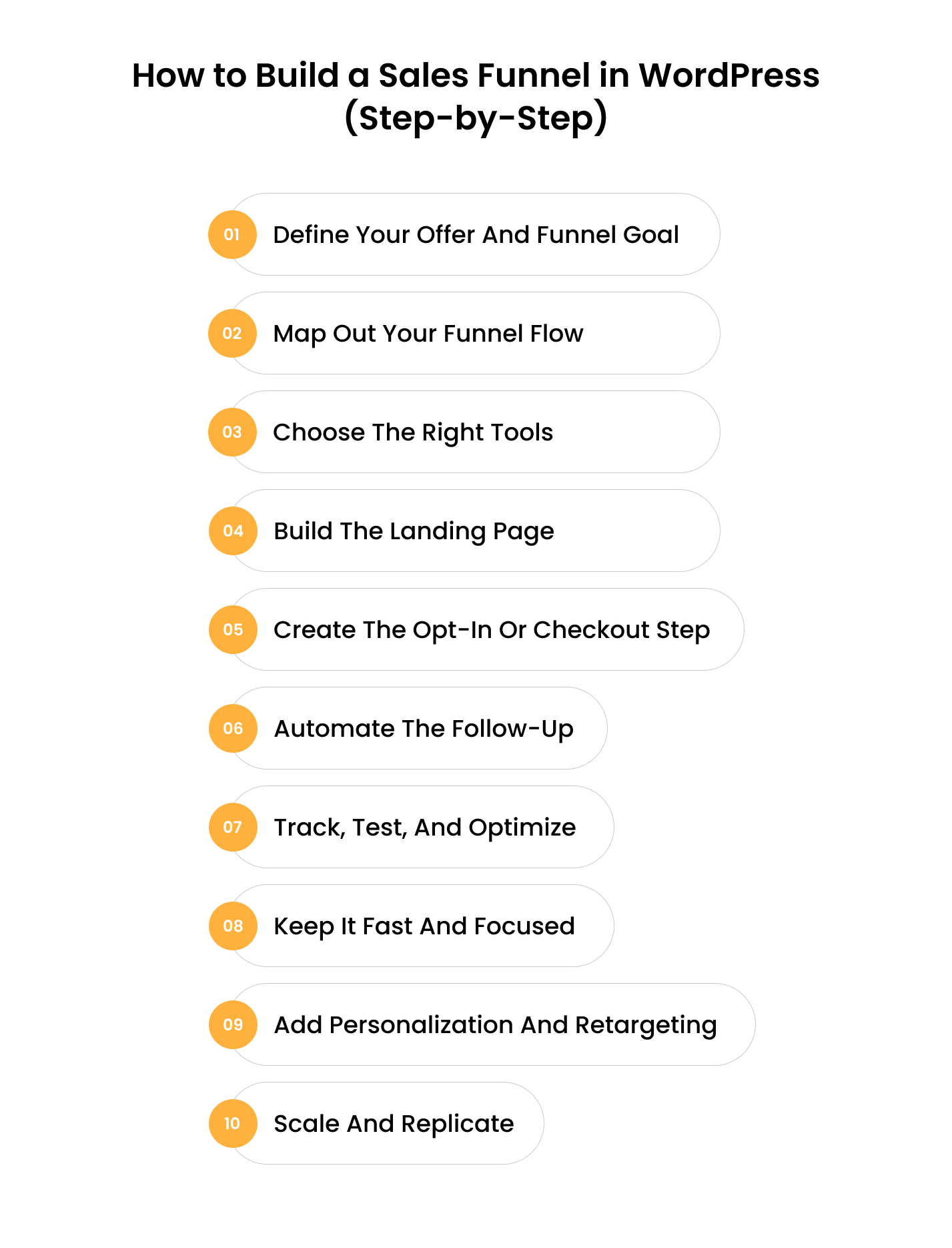
Building a sales funnel in WordPress isn’t about installing one plugin and hoping conversions magically happen. It’s about crafting a guided journey from discovery to decision, using tools, structure, and psychology. Let’s break down the steps to create a funnel in WordPress.
Step 1: Define Your Offer and Funnel Goal
Before you start building a sales funnel in WordPress, get clear on what you’re actually selling or offering.
Is it a product, a service, or a lead magnet? Your entire WordPress sales funnel will revolve around this one thing.
Ask:
- What problem am I solving?
- What is the single action I want people to take?
When you know the why, you can build the how.
Step 2: Map Out Your Funnel Flow
Sketch your funnel like a story.
A simple example: Ad/SEO Post → Landing Page → Opt-in → Checkout → Thank You Page → Email Follow-up
This is the foundation of building a sales funnel in WordPress; every step must move your visitor forward with intent. No distractions, no random links.
Also Read: How to Integrate WordPress with Mailchimp
Step 3: Choose the Right Tools
To build a WordPress funnel, you’ll need a solid foundation:
- Theme: Lightweight WordPress e-commerce theme options, such as GeneratePress or Astra, help keep your site fast.
- E-commerce: WooCommerce for product-based funnels.
- Page Builder: Elementor, Gutenberg, or Divi for design flexibility.
Quick-Tip: You can also use a WordPress funnel builder plugin like CartFlows, WPFunnels, or SeedProd. Each lets you visually design, connect, and optimize funnel steps.
4. Step 4: Build the Landing Page
Your landing page is where curiosity turns into consideration.
Here are some of the best practices to follow while building funnels with WordPress:
- Keep it simple: one offer, one CTA.
- Use visuals, testimonials, and urgency triggers.
- Plugins like SeedProd or Elementor Pro make it easy to design high-converting pages.
Remember, every pixel on your page should move visitors closer to the next step in your WordPress sales funnel.
Step 5: Create the Opt-in or Checkout Step
- If you’re collecting leads, use tools like Fluent Forms or Gravity Forms to capture data.
- If you’re selling, design your checkout with CartFlows or WPFunnels, add upsells, downsells, and order bumps without extra code.
This is where how to build a sales funnel in WordPress becomes tangible, because these micro-steps decide whether your traffic converts or leaves.
Step 6: Automate the Follow-Up
A funnel doesn’t end at checkout. It continues in the inbox. Use CRM or email tools like Mailchimp, HubSpot, or Groundhogg to automate follow-ups.
Set sequences while building a funnel with WordPress: Thank you → Value → Proof → Offer. Automation ensures your funnel keeps selling even while you sleep.
Step 7: Track, Test, and Optimize
Data makes funnels better.
- Install Google Analytics 4 and Meta Pixel to track conversions.
- Use A/B testing to experiment with headlines, CTAs, or offers.
Top WordPress funnel builder plugins like CartFlows include built-in analytics to show drop-off points; use them.
The best funnels are never finished. They evolve.
Optimizing your WooCommerce sales funnel is not just a one-off effort; it’s an ongoing process that necessitates keen observation, adaptation, and strategic planning.
8. Fix Redirects and 404 Pages, Don’t Waste SEO Value
Speed kills or saves funnels.
A one-second delay can drop conversions by up to 7%.
So, make sure to use caching plugins, optimize images, and remove unnecessary scripts while building funnels with WordPress.
Your WordPress funnel should load in under 3 seconds across all devices.
Also Read: How to Improve WordPress Website Speed?
Step 9: Add Personalization and Retargeting
Advanced funnels personalize content based on user intent or source. Show dynamic offers to visitors from ads, retarget cart abandoners, and use remarketing funnels.
The best WordPress funnel builder tools support integration with Facebook Pixel and Google Ads, allowing you to fine-tune retargeting with precision.
Step 10: Scale and Replicate
Once you have a winning funnel, clone it. Turn one offer into multiple niche-specific funnels, same logic, different audience. That’s the power of building funnels with WordPress: scalability without subscription bloat or coding chaos.
Final Thoughts: Something You Shouldn’t Miss Out!
If all of this feels like a lot to implement on your own, that’s completely normal. Building a sales funnel in WordPress isn’t just about plugins and pages; it’s about understanding user behavior, testing what works, and connecting every piece into one smooth experience.
At Enstacked, we help businesses bring that strategy to life. From funnel planning to analytics setup and conversion optimization, when you hire dedicated WordPress developers with us, we can help you make each step of your funnel purposeful and measurable.
Think of it less as outsourcing and more as refining what you’ve already built, turning traffic into insight, and insight into growth. To know more about us and how we can help you, book a free consultation call now.
Frequently Asked Questions(FAQs)
If SEO and speed are your priorities, Next.js is currently the best React framework for SEO. It supports both Server-Side Rendering (SSR) and Static Site Generation (SSG), giving you the flexibility to optimize how each page is served. Gatsby is another strong option if your content doesn’t change frequently and you want static, lightning-fast pages.
Yes. Most WordPress funnel builder plugins offer drag-and-drop interfaces that let you design, link, and optimize each funnel step visually. You can build a WordPress funnel in hours using pre-built templates, ready-made checkout flows, and built-in analytics.
A funnel has a single, goal-driven path; every page leads to one outcome, like a sale or signup. A typical website spreads attention across menus, posts, and links. When you know how to build a sales funnel in WordPress, you remove distractions and focus on guiding visitors through a controlled conversion journey.
CartFlows and WPFunnels are built specifically for WooCommerce. They add one-click upsells, order bumps, and optimized checkouts, features missing in standard WooCommerce setups, making them the best WordPress funnel plugins for eCommerce.
You can create nearly any type:
- Lead generation funnels
- Webinar registration funnels
- Product launch funnels
- Membership or course funnels
- Consultation booking funnels
Each can be built using WordPress funnel plugins with WooCommerce or standalone landing page builders.
Track metrics like conversion rate, bounce rate, AOV (average order value), and email open rates. Tools such as Google Analytics 4, Meta Pixel, and the built-in reports from WordPress funnel builder plugins help pinpoint which step drives or leaks conversions.
Yes. Elementor, Gutenberg, and Divi can all design the visual parts of your funnel. But for automation, upsells, and tracking, you’ll still need a sales funnel plugin for WordPress like CartFlows or WPFunnels to connect those designs into a functional flow.
Yes. You can start using free versions of WPFunnels, CartFlows Free, or SeedProd Lite combined with WooCommerce and a basic email plugin. While limited, these let you experiment with how to create a funnel in WordPress before investing in premium tools.

