

Introduction
What if building your next Shopify store felt less like a long project… and more like a quick conversation with an AI that actually understands your ideas?
That’s the promise behind the growing interest in Lovable Shopify integration.
More and more tech leaders are asking the same questions:
- Can I connect Lovable to Shopify?
- Can Lovable make a Shopify store?
- Can it even create a Shopify theme?
And the curiosity makes sense.
When an AI tool starts turning rough ideas into real, working code, every CEO, CTO, and ecommerce manager begins to wonder: How far can this go?
Lovable isn’t just another AI assistant. It’s becoming a creative partner that helps teams move faster, experiment more, and skip the slow, repetitive parts of ecommerce development.
Paired with Shopify’s powerful ecosystem, Lovable × Shopify integration opens up a whole new way to build and launch ecommerce experiences.
In this blog, we’ll break down what this integration actually looks like, what it can (and can’t) do today, and why so many innovative B2B teams are exploring Shopify Lovable AI integration as their next competitive edge.
Did you know that 51 % of e-commerce businesses are already using AI to create smoother, more personalized shopping experiences?
What is a Lovable Shopify Store?
A Lovable Shopify store is simply a Shopify store that’s built, assisted, or accelerated using Lovable AI. Instead of writing every line of Liquid, CSS, or JavaScript manually, teams use Lovable × Shopify integration to generate sections, pages, themes, and custom features much faster.
If Lovable nails the Shopify flow, we might finally see AI-assisted store creation that feels both fast and intentional, not just automated.
In practical terms, a Shopify Lovable store means:
- You use Lovable Shopify integration to turn ideas into working code instantly.
- You let Lovable generate theme sections, layouts, or even full-page structures.
- You build faster because Lovable handles the repetitive parts of development.
- You can prototype entire e-commerce flows, product pages, homepages, and carts within minutes.
- Your team focuses on strategy, UX, and brand instead of boilerplate code.
The goal is not to replace developers, but to supercharge them. With Shopify Lovable AI integration, both technical and non-technical teams can co-create a store that’s custom, scalable, and aligned with the brand.
In short, A Lovable Shopify store is a modern, AI-accelerated Shopify build powered by Lovable AI to make development faster, smarter, and more collaborative.
How Does Shopify Lovable AI Integration Work? A Simple Step-By-Step Guide You Need!
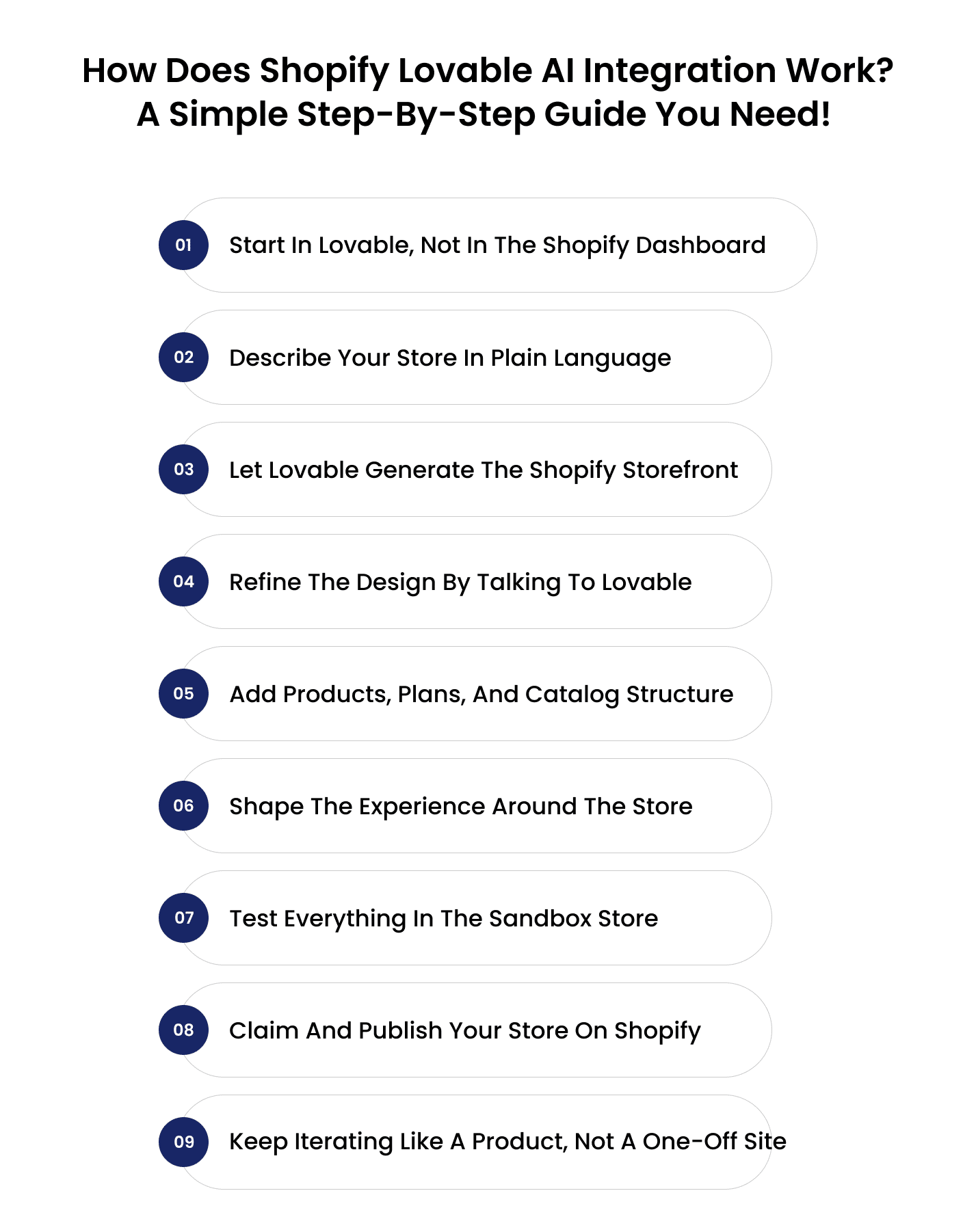
Step 1: Start in Lovable, not in the Shopify dashboard
Step 2: Describe your store in plain language
Instead of manually choosing a theme, layout, and settings, you describe the store you want. That’s where Shopify’s lovable AI integration really shows up.
You can give a prompt: Create a clean, B2B-focused Lovable Shopify store for a SaaS brand that sells usage-based analytics tools to mid-market companies in the US and Europe.
From there, Lovable uses AI to design the first version of your storefront: structure, layout, and basic content tuned to your prompt. You’re not picking from templates; you’re shaping the direction with natural language.
Step 3: Let Lovable Generate the Shopify Storefront
Once you’ve shared your idea, lovable Shopify integration does the heavy lifting. Behind the scenes, Lovable works with Shopify to:
- Create a homepage with hero, product highlights, social proof, and key sections
- Generate product pages and collection layouts
- Wire up the cart and checkout using Shopify’s e-commerce engine
- Set up navigation, footer, and basic site structure
In other words, Lovable x Shopify integration turns your description into a ready-to-edit Shopify storefront instead of a blank canvas.
Step 4: Refine the design by talking to Lovable
Now you have a working base. This is where the experience starts to feel different from a normal theme setup. You tweak your Lovable Shopify store by talking to the AI, for example:
- Make the hero section more B2B and less D2C, with a stronger emphasis on ROI.
- Add a comparison table for our three pricing tiers.
- Use a more serious color palette and adjust typography for enterprise buyers.
Lovable updates the layout, components, and copy, while still keeping everything compatible with Shopify. You’re using Shopify’s lovable AI integration to change the store at the level of intent, not just clicking through settings.
Pro Tip: Shopify CRO Best Practices to Rank Higher & Sell More in 2025
Step 5: Add products, plans, and catalog structure
Next, you flesh out the actual catalog. Instead of manually configuring every detail first, you can use prompts like:
- Create 6 B2B pricing plans with annual and monthly billing options.
- Add a collection for ‘Enterprise’ and another for ‘Growth’ customers.
- Generate placeholder products for add-ons like onboarding, training, and priority support.
Lovable then sets up products, product pages, and the related flows in the Shopify backend, using the Lovable Shopify integration to keep everything in sync. You can later jump into Shopify’s admin to refine pricing, inventory rules, and taxes as needed.
Step 6: Shape the experience around the store
A big advantage of Shopify Lovable is that it doesn’t stop at the storefront itself. You can ask Lovable to build the halo around your e-commerce experience:
- Landing pages for specific campaigns or industries
- Onboarding flows for new B2B customers
- Post-purchase pages, upsell flows, or customer dashboards
- Resource pages, FAQs, or Why us content targeted at decision makers
Here, Shopify’s lovable AI integration acts like a full product and marketing builder layered on top of Shopify’s core commerce engine.
Step 7: Test everything in the sandbox store
Before you go live, Lovable keeps your work inside a Shopify sandbox environment. That means you can safely test:
- Add-to-cart, checkout, and order flow
- Discount codes and basic promotions
- Navigation, mobile layouts, and page performance
No real payments, no real customers yet, just a safe place to validate that your Lovable Shopify store behaves as expected.
Step 8: Claim and publish your store on Shopify
When you’re satisfied with how your store looks and functions, you transition from building to launching.
Using the lovable Shopify integration, you:
- Claim” the store from Lovable, which links it to your real Shopify account
- Choose your Shopify plan, domain, and payment setup
- Publish the store so customers can start visiting and buying
From that point on, you have a live Shopify store built with AI, but you can still return to Shopify Lovable AI integration whenever you want to add new pages, test a different layout, or spin up a fresh idea for a campaign or product line.
Also read: Shopify Plus vs Shopify: Is the Upgrade Worth It?
Step 9: Keep iterating like a product, not a one-off site
The biggest mindset shift is this: with lovable x Shopify integration, your store is no longer a one-time project that takes months to change. It becomes a living product you can keep improving with quick conversations:
- Create a landing page for our new APAC launch.
- Test a different layout for the pricing section aimed at CFOs.
- Turn this case study into a high-intent landing page with a CTA for demos.
That’s the long-term power of a Lovable Shopify store: it turns continuous improvement into a habit, not a heavy roadmap item.
Also Read: Shopify Agentic Commerce – The Future of E-Commerce?
Wrapping Up!
The real story behind Lovable × Shopify integration is instead of waiting weeks for prototypes, juggling designer–developer handoffs, or rebuilding the same layouts again and again, you describe what you want, and Lovable turns it into something real.
Then you refine it. Then you iterate. For B2B decision-makers, this shift matters.
But AI doesn’t cover everything. It’s great at structure, layout, and speed. It still needs human thinking for performance, UX nuance, brand identity, CRO, complex integrations, and long-term scaling.
And, if you are looking for that human support, Enstacked can help. Whether you need store optimization, custom Shopify features, theme fixes, or a full migration, our team can refine and extend whatever Lovable creates.
To know more about us and how we can help you out, book a free consultation with our experts.
Frequently Asked Questions(FAQs)
Lovable offers a generous free tier for experimenting with AI-generated projects, but advanced features, like building a full lovable Shopify store or exporting code, require a paid plan.
Most AI ecommerce platforms use templates that feel generic or cookie-cutter. Lovable is different. It builds custom code, full layouts, and editable Shopify sections, so your Shopify lovable AI integration produces real Liquid, CSS, and JavaScript, not just drag-and-drop blocks.
Yes. With the lovable x Shopify integration, you can connect Lovable to a new Shopify sandbox store. This allows Lovable to generate your theme, pages, and layouts directly inside Shopify while you customize everything through prompts.
Yes. Lovable can generate full Shopify themes or individual modular sections. Each file is editable, exportable, and structured in the official Shopify theme format. This makes the Shopify lovable AI integration useful for both non-technical and technical teams.
Security remains 100% powered by Shopify. Lovable only builds the presentation layer, your Liquid theme, while Shopify handles PCI compliance, checkout encryption, data protection, and payment security.
Developers can fully edit the code Lovable generates. Your team can open the theme in GitHub, Theme Kit, or Shopify’s Theme Editor and extend it like any regular theme.
Yes, checkout extensibility, Shopify Markets, and plus-level workflows all remain supported. Lovable gives you the UI and logic; Shopify Plus handles the advanced commerce layer.
Lovable sets up the layouts and pages. Multi-language content, currencies, duties, and regional pricing still rely on Shopify Markets. You can, however, prompt Lovable to generate region-specific landing pages and UX components.
Lovable can build the new Shopify theme fast, but data migration, products, customers, orders, and needs API tools or migration apps.
Think: Lovable = Build the storefront
Migration tools = Move the data
Yes, especially for fast iteration, prototyping, and creating custom sections. Engineering teams still handle deep integrations, but AI accelerates everything around them.
Think: Lovable = Build the storefront
Migration tools = Move the data

