






Introduction
Implementing Salesforce is exciting, but it’s also where many companies stumble. The promise of better visibility, stronger customer relationships, and streamlined processes is real, but those benefits don’t just show up the moment you switch it on.
They only come if the rollout is done with clarity and discipline.
Too often, teams dive straight into configuration without a plan, only to realize later that data is messy, users aren’t adopting the system, or integrations don’t work the way they should.
A recent 2025 analysis reveals that around 70% of Salesforce rollouts fail to hit their intended goals, typically due to weak planning, undefined goals, or low adoption rates.
To understand how the right integrations can reduce these rollout failures, explore our Top Salesforce Integrations tool Every B2B Business Needs
Projects drag on, budgets stretch thin, and leadership starts questioning the value of the entire initiative.
The truth is, Salesforce isn’t hard to get right if you approach it methodically. What makes the difference is having a clear checklist to guide the process, one that keeps everyone aligned, avoids the common pitfalls, and ensures the platform is set up to deliver business outcomes from the start.
If you are looking for that exact Salesforce implementation checklist, then this blog is all you need.
Already decided Salesforce is your CRM of choice? Great — but if you’re still on the fence, our Salesforce vs HubSpot comparison breaks down their strengths and helps you choose with clarity.
What are the Phases of Salesforce Implementation? The Ultimate Checklist!
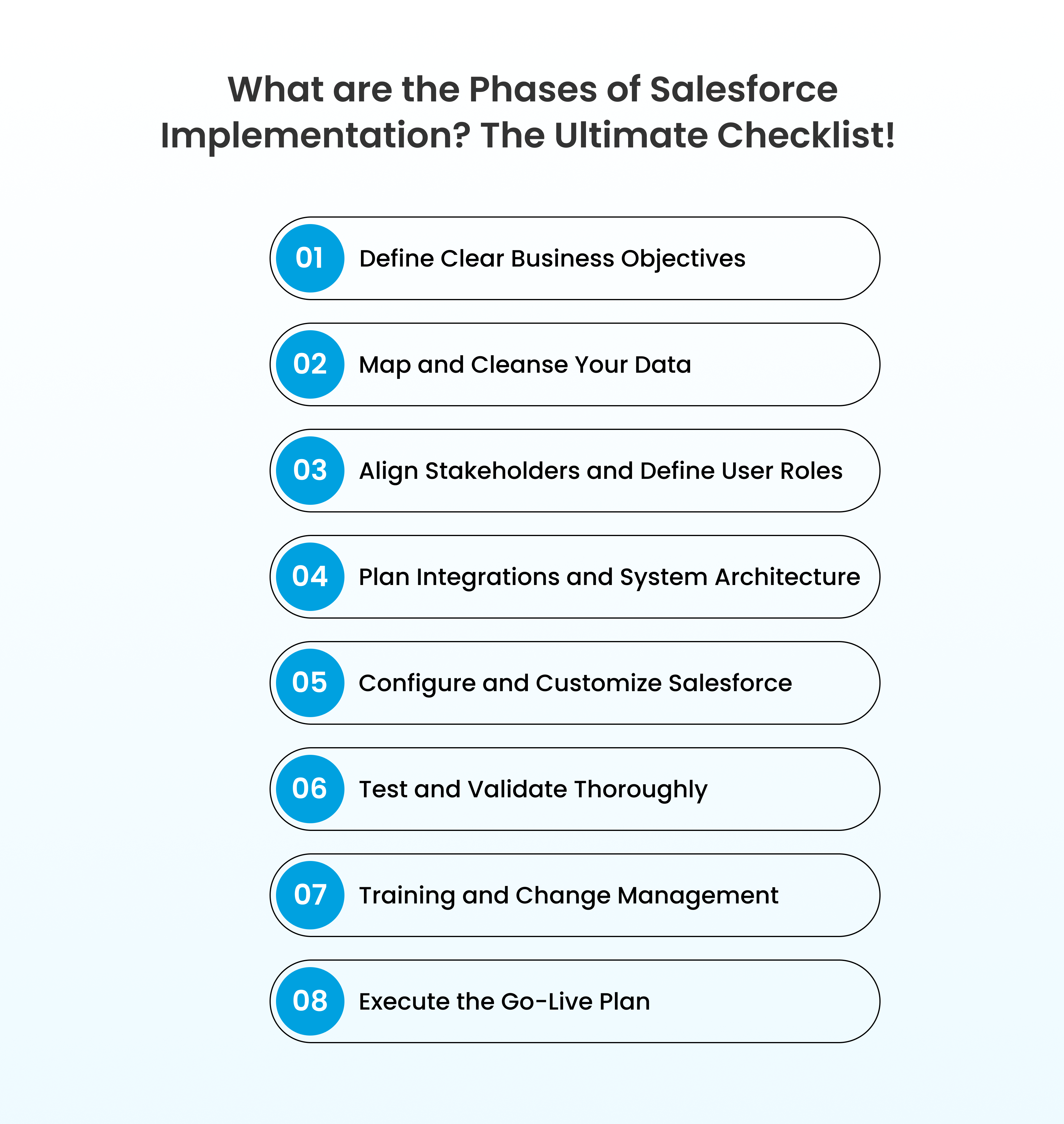
1. Define Clear Business Objectives
Every successful Salesforce implementation checklist for beginners starts with clarity on why you’re implementing Salesforce in the first place. The platform can do a lot, but without precise goals, your rollout risks becoming a costly exercise in over-engineering.
- What are the top three problems Salesforce must solve immediately?
- Do we want better sales pipeline visibility, improved customer service response times, or smarter marketing campaigns?
- How will success be measured: revenue growth, faster case resolution, increased forecast accuracy?
Also Read: Salesforce Developer Hourly Rate in the US for 2026
Ask yourself and your leadership team:
- What are the top three problems Salesforce must solve immediately?
- Do we want better sales pipeline visibility, improved customer service response times, or smarter marketing campaigns?
- How will success be measured: revenue growth, faster case resolution, increased forecast accuracy?
Having well-defined goals ensures you configure Salesforce to deliver outcomes that matter, rather than chasing every shiny feature.
Often, the first thing that people do is start focusing on the technology. However, in my experience, the most successful companies recognize that they should first focus on the business process. The solution becomes much more powerful when the technology aligns with the business objectives.
— John Durocher, EVP, Salesforce.com’s Customers for Life
2. Map and Cleanse Your Data
Salesforce only performs as well as the data you feed it. Too often, companies migrate years of duplicate, inconsistent, or incomplete records and end up with frustrated users who don’t trust the system. That’s why data preparation is non-negotiable on any Salesforce implementation checklist for beginners or advanced teams alike.
Key actions here:
- Audit existing systems: Identify where your customer, sales, and service data currently lives (spreadsheets, legacy CRMs, email marketing tools, etc.).
- Cleanse data: Remove duplicates, fix inconsistencies, and standardize fields like phone numbers, job titles, and industry tags.
- Decide what’s worth moving: Not every old record deserves a place in Salesforce. Move data that adds value and archive the rest.
- Plan for data governance: Define rules for ongoing data hygiene so Salesforce stays clean after go-live.
Pro-tip: In a Salesforce Service Cloud implementation checklist, prioritize case history, knowledge base content, and customer contact records to ensure seamless service from day one.
A clean data foundation sets you up for faster adoption, higher trust, and a smoother transition to go-live.
3. Align Stakeholders and Define User Roles
Even the best system fails if people don’t use it. A strong Salesforce implementation checklist for beginners should always include stakeholder alignment, because adoption starts long before go-live.
Steps to cover:
- Identify key stakeholders: Sales leaders, service managers, operations heads, IT, and compliance teams. Each has different priorities that Salesforce must support.
- Map user roles: Define who needs access to what, sales reps, service agents, managers, and executives should see the data and dashboards relevant to them.
- Gather requirements early: Sit with each group to understand pain points. Sales may want mobile access to update opportunities, while service teams may need faster case routing.
- Secure leadership buy-in: Executives should champion Salesforce usage, not just approve the budget. Visible support drives adoption at every level.
Getting roles and expectations right ensures smoother training, less resistance, and a higher chance that Salesforce becomes the single source of truth rather than just another tool.
4. Plan Integrations and System Architecture
Salesforce rarely works in isolation. To deliver maximum value, it must connect seamlessly with your existing ecosystem, whether that’s ERP, marketing automation, customer support tools, or custom applications. A well-designed architecture avoids costly rework later.
Steps to cover:
- Map current tech stack: Identify all systems Salesforce must integrate with all the relevant tools, and prioritize critical integrations.
- Choose integration methods: Decide whether APIs, middleware (like MuleSoft), or native Salesforce connectors fit best.
- Plan scalability: Build an architecture that supports future needs and doesn’t lock you into a short-term solution.
- Test integration flows: Before going live, validate data syncs, workflows, and triggers to prevent disruption.
Strong architecture and integrations set the stage for a reliable Salesforce go-live checklist, where every process runs seamlessly from day one.
5. Configure and Customize Salesforce
Too many projects sink because teams over-engineer from the start. The smartest way to approach Salesforce is simple: configure first, customize later — and only when absolutely necessary. Salesforce is built with flexibility in mind; with the right process mapping, most requirements can be achieved without a single line of code.
Steps to follow:
- Lean on configuration first: Page layouts, record types, flows, validation rules, and dashboards cover 80% of typical business needs. These should always be the starting point before considering Apex.
- Customize with intent: When standard features hit a wall, introduce Apex, Lightning Web Components, or third-party apps, but always design for maintainability. Quick fixes today often become technical debt tomorrow.
- Keep scalability in mind: Objects, fields, and automations should be built to scale with the business. Over-customization makes upgrades painful and slows down future changes.
- Document everything: Every flow, trigger, and field mapping should be logged. Future admins and developers should never have to guess why something exists.
- Validate with end-users: Let sales reps or service agents preview layouts and workflows to ensure the setup matches their day-to-day needs.
6. Test and Validate Thoroughly
A Salesforce rollout should never go live without rigorous testing. Skipping this step is one of the fastest ways to erode user trust and create resistance to adoption. Testing ensures that workflows, automations, integrations, and data migrations behave exactly as intended before the platform reaches end-users.
Best practices to follow:
- Unit testing: Validate every flow, validation rule, and trigger individually to ensure they work as designed.
- Integration testing: Confirm that Salesforce communicates seamlessly with connected systems such as ERP, marketing automation, or telephony.
- User Acceptance Testing (UAT): Involve sales reps, service agents, and managers in hands-on testing.
- Data validation: Verify that migrated records are complete, accurate, and de-duplicated. Broken links, mismatched fields, or missing data can undermine the entire rollout.
- Performance checks: Ensure that pages, reports, and automations load efficiently, even with large volumes of data.
Pro tip: For a Salesforce Sales Cloud implementation checklist, test opportunity stages, pipeline dashboards, and forecasting accuracy with real sales scenarios.
7. Training and Change Management
Even the most technically sound Salesforce build will fail if people don’t use it. Change management and training are as important to understand not just how to use Salesforce, but why it matters to their daily work and the business as a whole.
Best practices to follow:
- Role-based training: Design training modules for different user groups — sales reps, service agents, managers, and executives each needs tailored sessions.
- Hands-on learning: Provide sandbox or test environments where users can practice with real scenarios before going live.
- Communicate benefits clearly: Show how Salesforce eliminates manual work, improves visibility, or speeds up decision-making. Adoption rises when users see personal value.
- Offer ongoing support: Training is not a one-time event. Provide refresher sessions, knowledge articles, and quick tip sheets to keep adoption levels high.
Pro tip: Well-prepared training and structured change management ensure that the Salesforce go-live checklist doesn’t end with launch day; it extends into sustainable adoption across the organization.
8. Execute the Go-Live Plan
Go-live is the milestone where months of preparation meet real-world usage. A structured Salesforce go-live checklist ensures the transition is smooth, users feel supported, and operations don’t suffer unexpected disruptions.
Best practices to follow:
- Finalize data migration: Confirm all records are migrated, validated, and accessible to end-users. Run reconciliation reports to check for accuracy.
- Activate critical automations: Enable workflows, validation rules, and case assignments that were tested in staging.
- Set up monitoring: Configure dashboards or reports that track system adoption, data quality, and performance from day one.
- Provide hypercare support: Staff extra admins or power users during the first weeks to resolve issues quickly and maintain user confidence.
- Communicate clearly: Announce the go-live, highlight immediate benefits, and reassure users about available support channels.
A strong Salesforce go-live checklist minimizes disruption, accelerates adoption, and ensures leadership sees value from the very first day.
Expert Tips to Strengthen Your Salesforce Implementation Checklist!
Beyond the structured steps, there are a few hard-earned lessons that consistently make the difference between an average rollout and a high-impact one.
- Keep the implementation lean at first: Launch with core features that solve immediate pain points. Add advanced functionality only after adoption stabilizes. This reduces complexity and accelerates ROI.
- Prioritize data governance from day one: Define ownership, validation rules, and update protocols early. A dirty Salesforce org is much harder to fix later than it is to prevent from the start.
- Build for admin self-sufficiency: Configure Salesforce so internal admins can manage most changes without developer intervention. This keeps the system agile and reduces long-term costs.
- Use Salesforce’s release cycle to your advantage: With three major releases a year, always review new features before building custom solutions. Often, Salesforce delivers what’s needed out of the box.
- Document integration dependencies: If Salesforce connects to ERP, finance, or marketing systems, keep documentation of data flows updated. This avoids downtime during upgrades or staff changes.
- Invest in ongoing enablement: Training doesn’t end after go-live. Regular workshops, updated guides, and refresher sessions ensure the platform grows with the business.
When combined with the steps in this Salesforce implementation checklist for beginners, these expert practices help organizations avoid the classic pitfalls, achieve faster adoption, and unlock the full potential of Salesforce.
Also Read: The Comprehensive Salesforce Implementation Guide You Need to Know in 2025!
What is the average Salesforce implementation cost?
The average Salesforce implementation cost in 2025 depends heavily on company size, scope, and complexity.
- Small businesses typically spend $10,000–$35,000 for basic setups.
- Mid-sized companies invest $35,000–$100,000+ for automation and customization
- Large enterprises often reach $100,000–$500,000+ with advanced workflows, multiple Clouds, and integrations.
To know more about Salesforce licensing costs and other factors that affect the Salesforce implementation cost.
To get an accurate Salesforce implementation cost estimate, book a free consultation
Final Thoughts!
A Salesforce rollout isn’t won on launch day; it’s won in the preparation.
Each step of the Salesforce implementation checklist exists to remove uncertainty and ensure a successful roll-out.
With a structured checklist guiding every phase, the odds shift dramatically in your favor. S
o, use this checklist as your playbook, refine it for your unique context, and you’ll set the stage for a CRM that delivers on its promise: faster growth, smarter decisions, and a unified view of the customer.
And, if you are looking for an expert who can help you through the Salesforce implementation process or maybe optimization, then hire dedicated developers in US with Enstacked.
Frequently Asked Questions(FAQs)
The Salesforce implementation could take anywhere around 3 to 6 months for small to mid-sized projects. Large, enterprise-wide rollouts can take 12–18 months, depending on complexity and integrations.
Track KPIs like user adoption rates, lead conversion, sales cycle length, case resolution times, and forecast accuracy. These metrics show whether Salesforce is delivering business value.
The most common reasons include unclear objectives, poor data quality, low user adoption, over-customization, and lack of executive sponsorship.