


Introduction
Your sales, marketing, customer success, and support teams each operate in their own silo. Data isn’t shared, pipelines are opaque, and opportunities slip through the cracks.
As an executive steering a B2B organization toward exponential growth, you know this fragmented reality isn’t just inefficient, it’s costly.
That’s where Salesforce comes in, not only as a powerful CRM, but as a central command center for your entire operational stack. And yes, the real game-changer is not just Salesforce. It’s the integrations that elevate it.
Learn how Salesforce stacks up against HubSpot in our Salesforce vs HubSpot for B2B Sales comparison.
Think of seamless integrations as strategic amplifiers:
- They align marketing, sales, and service in real time.
- They empower rapid decision-making with up-to-date data, eliminating guesswork and providing insight.
- And they unlock exponential ROI.
Even small businesses are seeing transformative returns, some hitting over 300% ROI, and in rare cases, as much as 998%, by integrating Salesforce with existing systems.
These aren’t just numbers, they’re strategic shifts. With the best Salesforce integrations tools list, your organization can achieve seamless data flow, operational precision, and measurable growth.
So, let’s dive deeper: which are the best Salesforce integrations that every B2B leader should consider to turn these ROI figures into reality?
What are Salesforce Integrations?
The Salesforce integrations tools is integrations between Salesforce and the other tools your business already uses.
Think of Salesforce as your company’s central hub for customer data. But on its own, it can’t do everything. That’s where integrations come in; they link Salesforce with platforms like marketing automation, collaboration tools, e-commerce, ERP systems, etc.
Follow our Salesforce implementaion Checklist to launch integrations the right way.
The result? All your data flows into one place, your teams stop working in silos, and everyone, from sales to service, gets a complete, real-time picture of the customer.
In short, the Salesforce integration tools list makes your CRM smarter, faster, and more connected, so your business runs smoother and grows quicker.
Their API is widely available, meaning it can integrate with almost any product. This is great for longevity because a lot of other companies want to work with Salesforce and integrate.
— ftlftlftl
10 Best Salesforce Integration Tools List You Should Know About in 2025!
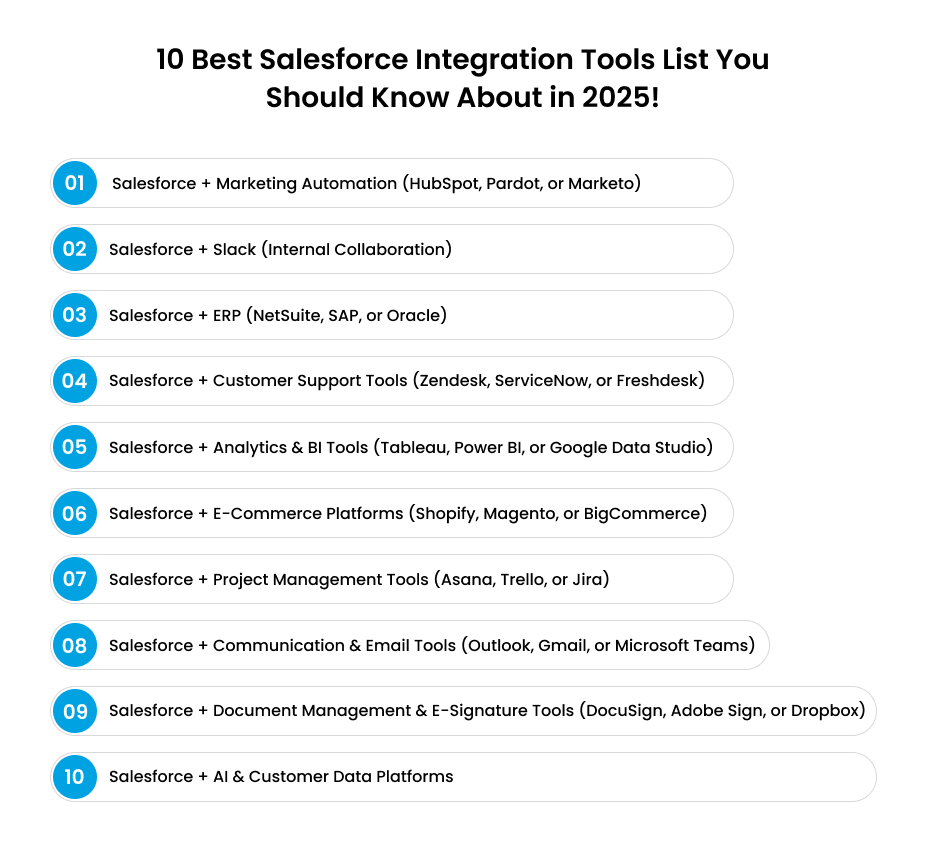
1. Salesforce + Marketing Automation (HubSpot, Pardot, or Marketo)
Marketing and sales alignment is where revenue acceleration begins. Integrating Salesforce with a marketing automation platform ensures your marketing-qualified leads (MQLs) flow seamlessly into your CRM, giving your sales team real-time visibility into lead behavior, intent, and engagement.
According to HubSpot, companies that align marketing and sales with integrated tools can see a 36% higher customer retention rate and 38% higher sales win rates.
How does it help?
- Lead Scoring and Nurturing: Prioritize high-intent leads with automated scoring models.
- Seamless Handoff: Marketing data syncs instantly with sales, reducing friction and improving follow-up times.
- Closed-Loop Reporting: Track every campaign’s ROI by connecting lead acquisition data with closed deals.
- Personalized Customer Journeys: Deliver hyper-personalized campaigns at scale, dynamic content, behavior-triggered emails, and tailored nurturing paths that speak directly to each account’s needs, boosting engagement and conversions.
2. Salesforce + Slack (Internal Collaboration)
Speed is the currency of modern business. Integrating Salesforce with Slack bridges the gap between your CRM and daily team communications, ensuring everyone has instant access to critical data without switching platforms.
According to Salesforce, companies using the Salesforce-Slack integration saw a 25% reduction in deal cycles and 32% improvement in pipeline visibility.
- Real-Time Alerts: Get instant updates for lead assignments, closed deals, or support escalations.
- Streamlined Workflows: Automate notifications for pipeline changes or contract renewals.
- Enhanced Collaboration: Teams can discuss opportunities in context, leading to faster decisions and deal closures.
- Faster Executive Oversight: Leaders can monitor deal progression, intervene when necessary, and keep teams accountable without digging through reports.
3. Salesforce + ERP (NetSuite, SAP, or Oracle)
For executives, growth isn’t just about winning deals; it’s about delivering on them profitably. That’s where integrating Salesforce with your ERP system becomes a game-changer.
While Salesforce manages the customer-facing side of the business, your ERP system runs the back-office: finance, inventory, supply chain, and order management. When these two platforms speak the same language, you get a single source of truth across the entire customer lifecycle.
How does it help?
- End-to-End Visibility: Sales teams can see inventory, pricing, and delivery timelines directly within Salesforce, avoiding overpromises and costly delays.
- Faster Quote-to-Cash: Automated syncing between Salesforce and ERP accelerates quoting, order processing, invoicing, and payments, shortening the revenue cycle.
- Accurate Forecasting: Finance leaders gain real-time visibility into booked deals and projected revenue.
- Better Customer Experience: Service teams can update clients on order status, billing, or renewals instantly.
4. Salesforce + Customer Support Tools (Zendesk, ServiceNow, or Freshdesk)
Winning a deal is only half the battle. In B2B, long-term growth depends on keeping customers happy and loyal. Integrating Salesforce with your customer support platform ensures every service interaction is tied back to the customer’s full journey, sales, contracts, and engagement history, so your teams can resolve issues faster and build stronger relationships.
According to Salesforce’s State of the Connected Customer report, 88% of customers say the experience a company provides is as important as its products or services.
How does it help?
- 360° Customer View: Support agents see purchase history, contract details, and past interactions directly in their helpdesk, eliminating guesswork.
- Proactive Service: By combining support data with Salesforce insights, businesses can spot churn risks early and engage customers before problems escalate.
- Smarter Escalations: Critical issues automatically create Salesforce cases linked to the right account executive, ensuring faster resolution.
- Upsell & Renewal Opportunities: Service teams become revenue enablers by surfacing cross-sell or renewal signals during support interactions.
5. Salesforce + Analytics & BI Tools (Tableau, Power BI, or Google Data Studio)
Integrating Salesforce with advanced analytics and business intelligence (BI) platforms transforms raw CRM data into actionable insights for executives and decision-makers. Instead of reactive reports, leaders gain predictive visibility into pipeline health, customer behavior, and market trends.
Read our Salesforce Implementation Cost 2025 guide for smarter analytics planning.
According to Forbes, companies that leverage advanced analytics in decision-making are 23 times more likely to acquire customers and 19 times more likely to be profitable.
How does it help?
- Executive Dashboards: Consolidate KPIs like pipeline velocity, win rates, and customer lifetime value into real-time dashboards.
- Predictive Forecasting: Combine Salesforce data with BI models to forecast revenue, churn risk, and sales trends more accurately.
- Data-Driven Strategy: Identify which industries, geographies, or account segments deliver the highest ROI.
- Cross-System Intelligence: Pull in financial, marketing, and operational data alongside Salesforce metrics.
- Faster Decisions: With AI-powered insights and visualization, leaders can act on trends in hours, not weeks, turning agility into a growth advantage.
6. Use Personalization to Guide Shoppers
Integrating Salesforce with your e-commerce platform creates a seamless bridge between online transactions and CRM data, enabling personalized buying experiences and streamlined operations.
Learn how Salesforce B2B Commerce Lightning transforms digital selling.
According to McKinsey, 65% of B2B companies are now fully transacting online, and those with integrated digital channels see revenue growth 2x faster than peers who don’t.
How does it help?
- Unified Customer Data: Sync orders, purchase history, and account details directly into Salesforce for a single customer view.
- Personalized Recommendations: Leverage Salesforce data to create tailored product suggestions and promotions in e-commerce storefronts.
- Inventory & Pricing Transparency: Ensure buyers see accurate availability and contract-based pricing in real time.
- Frictionless Ordering: Automate reorders, quotes, and approvals, especially vital in B2B repeat-purchase cycles.
Revenue Insights: Combine e-commerce transactions with Salesforce analytics to monitor digital revenue growth.
7. Salesforce + Project Management Tools (Asana, Trello, or Jira)
Closing a deal is only the beginning. For B2B companies handling complex deliveries, whether it’s software implementation, professional services, or logistics, integrating Salesforce with project management platforms ensures commitments are executed smoothly.
How does it help?
- Smooth Handoff from Sales to Delivery: Automatically create projects in Asana or Jira when deals close in Salesforce.
- Client Transparency: Provide customers with progress updates tied to Salesforce accounts, building trust and accountability.
- Aligned Teams: Keep sales, project managers, and service teams in sync with tasks, deadlines, and milestones visible in both systems.
- Risk Mitigation: Identify bottlenecks early by combining CRM deal data with project execution data.
- Improved Customer Experience: Deliver projects on time and on budget, which directly impacts renewal rates and upsell opportunities.
8. Salesforce + Communication & Email Tools (Outlook, Gmail, or Microsoft Teams)
Email and communication remain the backbone of B2B engagement. By integrating Salesforce with Outlook, Gmail, or Microsoft Teams, every conversation becomes part of the customer record, giving executives a complete view of engagement without relying on manual updates.
How does it help?
- Automatic Activity Capture: Emails, meetings, and calls sync into Salesforce instantly, reducing admin work.
- Faster Follow-Ups: Calendar and email integrations ensure prospects never slip through the cracks.
- Enhanced Collaboration: Teams using Microsoft Teams or Google Meet can surface Salesforce data during conversations, driving context-driven decisions.
9. Salesforce + Document Management & E-Signature Tools (DocuSign, Adobe Sign, or Dropbox)
In B2B, delays in paperwork often stall revenue. Integrating Salesforce with e-signature and document management platforms like DocuSign or Adobe Sign removes bottlenecks in contract cycles—making agreements fast, secure, and trackable.
How does it help?
- Faster Contract Cycles: Generate, send, and sign contracts directly within Salesforce, cutting days or weeks off deal closure.
- Legal & Compliance Confidence: Maintain secure, auditable trails of all agreements.
- Customer Convenience: Clients sign from any device, improving experience and reducing drop-offs.
- Revenue Acceleration: Shorter time-to-sign directly impacts quarterly results.
- Operational Efficiency: Automate document storage in Salesforce records, eliminating manual uploads.
10. Salesforce + AI & Customer Data Platforms
The future of B2B growth lies in data intelligence and predictive insights. By integrating Salesforce with AI engines or Customer Data Platforms, businesses can unify fragmented customer data and apply machine learning to anticipate needs, predict churn, and personalize engagement at scale.
How does it help?
- Unified Data Foundation: Break down silos by connecting data from multiple systems (ERP, marketing, support) into Salesforce.
- Predictive Insights: Use AI to identify high-probability deals, churn risks, and upsell opportunities.
- Hyper-Personalization: Deliver the right message to the right decision-maker at the right time, based on behavioral and intent data.
- Operational Agility: AI-driven automation accelerates tasks like lead routing, forecasting, and opportunity scoring.
Check out our Salesforce Implementation Guide 2025 for complete rollout steps.
Final Thoughts
For B2B leaders, Salesforce is far more than a CRM; it’s the foundation of a connected enterprise. But the real transformation happens when it’s extended through the right integrations.
Executives who invest in these integrations don’t just gain efficiency, they gain strategic agility: the ability to anticipate customer needs, act on insights in real time, and scale with confidence.
The result? Higher ROI, stronger customer loyalty, and a business that’s built for the next decade, not just the next quarter.
At Enstacked, we help businesses like yours unlock the full power of Salesforce with end-to-end integration strategies tailored to your goals. If you’re ready to move beyond a standalone CRM and build a truly connected ecosystem, let’s talk to discuss things and hire dedicated developers in US.
Frequently Asked Questions(FAQs)
Salesforce offers tools like MuleSoft, Salesforce Connect, REST & SOAP APIs, and AppExchange apps to connect Salesforce with other systems.
Salesforce integrates with popular platforms like Slack, HubSpot, Marketo, Pardot, Shopify, NetSuite, Zendesk, DocuSign, Tableau, and Microsoft Outlook/Gmail, covering sales, marketing, e-commerce, support, and more.
The main types are:
- API-Based Integrations (REST, SOAP, Bulk API)
- App-Based Integrations (via Salesforce AppExchange)
- Middleware Tools (MuleSoft, Zapier, Boomi)
- Native Connectors (Salesforce Connect, prebuilt adapters)
Start with your business goals. If you want better lead management, integrate with marketing tools. If you need efficiency, connect with ERP or project management systems. Always pick integrations that solve your biggest pain points first.

